
What Is Ping in Gaming? The Ultimate Guide to Latency, Lag & Low-Ping Performance
Low ping can mean the difference between victory and defeat. Learn what ping really is, how latency affects online gaming, and the best ways to reduce lag for smoother, faster gameplay in 2026.
Why Ping Makes or Breaks Online Games
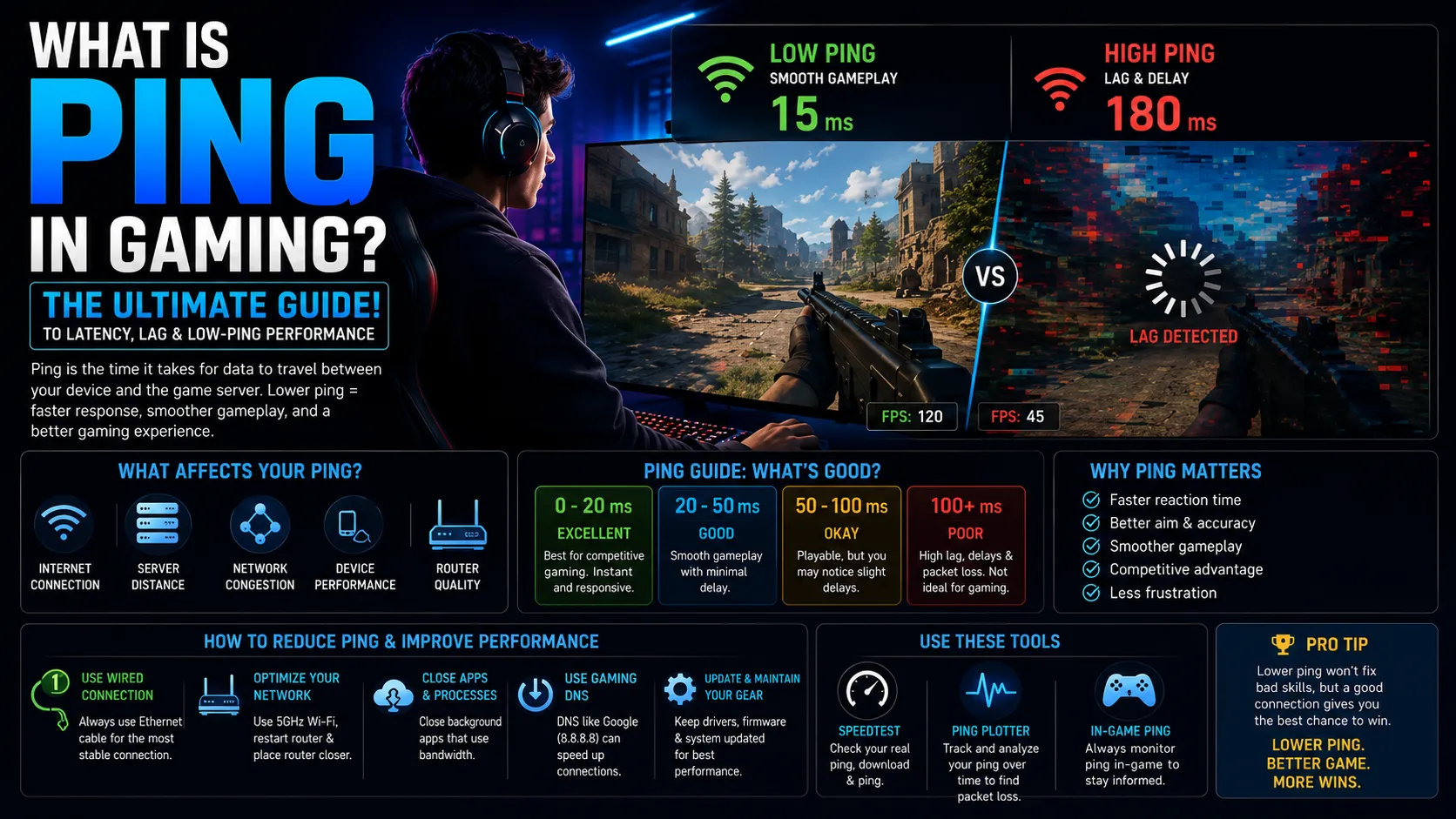
Every time you press a button in an online game to fire a weapon, sprint, or cast a spell, your device sends a signal to a remote game server. That server processes the action and then sends a response to your screen. The total round-trip time for this exchange is your ping.
Understanding what ping is in gaming is the first step toward diagnosing connection problems and actually fixing them. Whether you're experiencing rubber-banding in a battle royale, getting teleporting enemies in a shooter, or seeing a yellow lag icon in your favorite MMORPG, ping is almost always involved.
This guide covers everything from the technical definition and the meaning of low ping to the exact steps you can take right now to reduce ping in games. If you play any online game and want a competitive edge, this article is for you.
How Ping Works in Online Gaming
The word "ping" comes from sonar technology, where a sound pulse is sent out, and the echo is timed. In networking, ping works the same way. Your device sends an ICMP (Internet Control Message Protocol) echo request to a target server, and the server sends an echo reply. The total elapsed time measured in milliseconds is your ping value.
The Round-Trip Journey of a Gaming Packet
When you play an online game, every player's action triggers this sequence:
Your device generates a data packet containing your input (e.g., "player fired weapon at coordinates X, Y").
The packet travels from your device through your router, through your Internet Service Provider (ISP) network, through the public internet, and finally to the game server.
The game server processes the input and sends a response packet back along a similar route.
Your device receives the packet and updates the game state on your screen.
Gaming latency is the total time this full journey takes. Every millisecond counts, especially in fast-paced genres like first-person shooters (FPS), fighting games, and battle royales.
How Is Ping Measured in Games?
Most online games display your ping directly in the HUD (heads-up display) or a dedicated network diagnostic panel. The number you see, often labeled "ping," "ms," or "latency," is a live or averaged reading of your round-trip time to the game server. Tools like the Windows command ping [server IP] or third-party utilities like PingPlotter can also measure gaming latency outside the game client.
What Is a Good Ping vs. a Bad Ping?
Low ping, meaning in practical terms: the smaller the number, the more responsive your game feels. Here is a widely accepted breakdown used by network engineers and competitive gaming communities:
Range | Classification | Experience | Suitable For |
|---|---|---|---|
< 20 ms | Excellent | Near-instantaneous response | Competitive/professional play |
20 – 50 ms | Good | Smooth, no perceptible delay | Smooth, no perceptible delay |
50 – 100 ms | Acceptable | Slight delay in fast games | Casual gaming, RPGs, strategy |
100 – 150 ms | Poor | Noticeable lag, input delays | Slow-paced games only |
> 150 ms | Unplayable | Severe lag, rubber-banding | Not suitable for online play |
Ping vs. Lag: What's the Difference?
Players often use "ping" and "lag" interchangeably, but the two terms describe different things:
Ping is a measurement of the time in milliseconds that represents round-trip network latency.
Lag is the general feeling that the game is delayed, stuttering, or unresponsive. Lag can result from high ping, but also from frame rate drops, server-side issues, or packet loss.
High ping is one of the most common causes of lag, but not the only one. A player can have 30 ms ping and still experience lag if their computer's frame rate drops below 30 Frames Per Second (FPS), or if the game server itself is overloaded.
What Is Packet Loss and How Does It Differ from Ping?
Packet loss occurs when some data packets traveling between your device and the game server fail to arrive. Even with a low average ping, 5-10% packet loss can cause severe in-game stuttering, teleportation of other players, and disconnections. Packet loss is measured as a percentage, not in milliseconds. Tools like tracert (Windows) or traceroute (Mac/Linux) can reveal where packets are being dropped along the network route.
What Causes High Ping in Gaming?
Diagnosing high ping requires understanding the full path your data travels. Here are the most common causes, ranked by frequency:
Physical Distance to the Game Server
Data cannot travel faster than the speed of light. A player in Sydney connecting to a game server in New York will always have higher ping than a player in New Jersey connecting to the same server, regardless of internet speed. This is why connecting to the nearest server region is the single most impactful ping optimization available.
Wi-Fi Interference and Signal Instability
Wireless connections introduce latency variability. Competing signals from neighboring routers, walls, and interference from household appliances (especially 2.4 GHz devices like microwaves and baby monitors) can spike ping from 30 ms to 150 ms instantly. Wired Ethernet connections eliminate this category of problem.
Network Congestion
When multiple devices on a home network simultaneously consume bandwidth streaming 4K video, downloading files, and running video calls, the available bandwidth for gaming shrinks. Routers with Quality of Service (QoS) settings can prioritize gaming traffic over other household usage.
ISP Routing Inefficiencies
Your internet service provider routes your traffic through a series of network nodes. Poor routing decisions, where your data takes a roundabout path instead of the most direct route, can add 20-80 ms of unnecessary latency. This is something your ISP controls, not you, though some gaming VPNs claim to address this.
Server-Side Latency
Game servers have their own processing load. During peak hours or when a server is under heavy player load, the server tick rate drops. A server running at 64 tick processes player inputs 64 times per second. A server at 20 tick processes them only 20 times per second, effectively creating artificial lag even when your connection ping is low.
How to Reduce Ping in Games: Proven Fixes
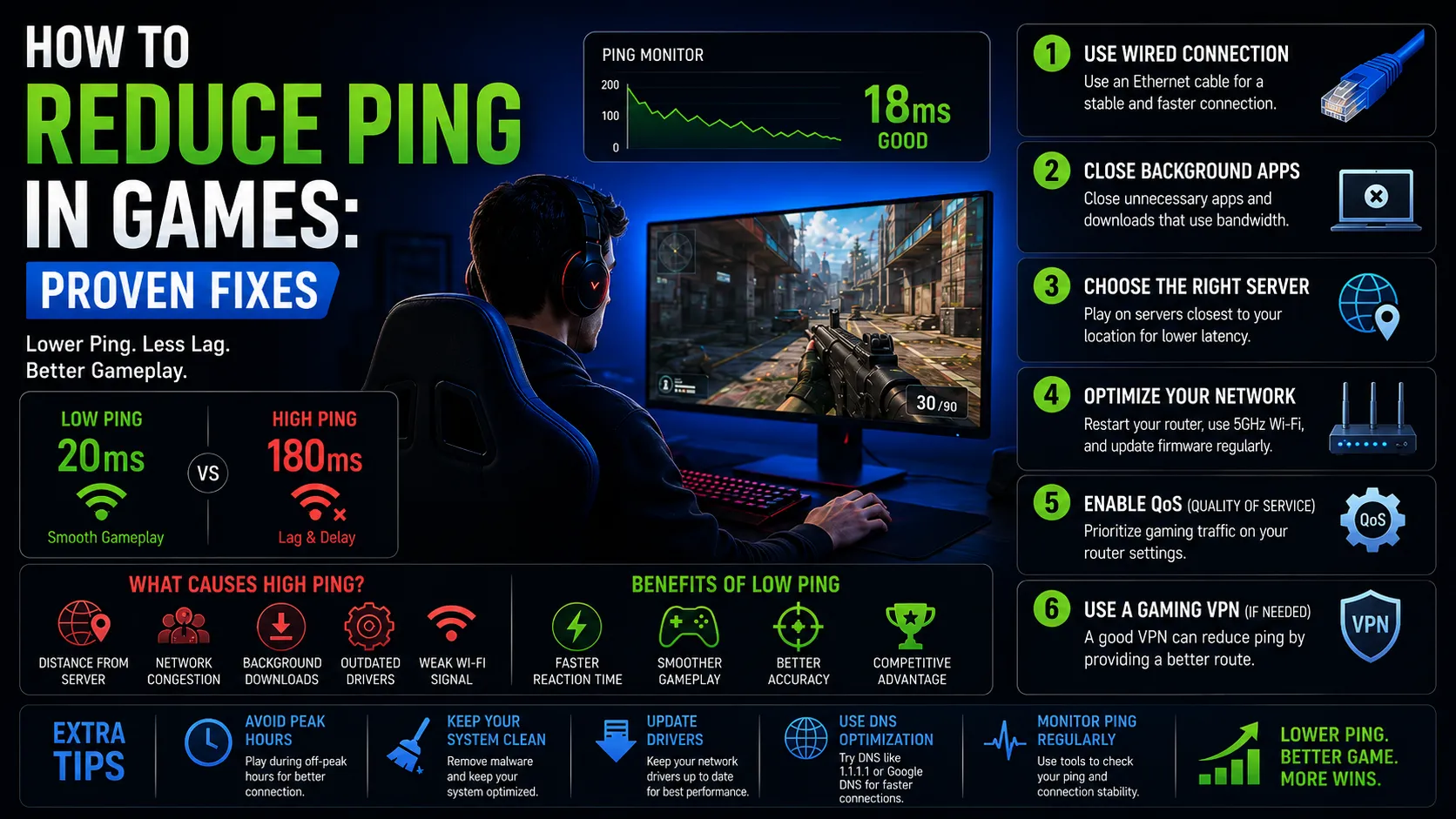
Reducing ping in games follows a logical hierarchy, starting with the highest-impact changes first.
Switch from Wi-Fi to a Wired Ethernet Connection
This single change eliminates wireless interference, reduces average ping by 5-20 ms in most home environments, and dramatically reduces ping spikes. A Cat 6 Ethernet cable costs under $15 and is the best return-on-investment upgrade available to any online gamer.
Choose the Closest Game Server Region
Most online games allow players to manually select their server region. Always choose the region geographically nearest to your physical location. Changing from a cross-continental server to a local one can reduce ping by 80-150 ms instantly.
Close Background Applications Consuming Bandwidth
Cloud backups, streaming apps, browser tabs with video, and peer-to-peer applications all compete for bandwidth. Close or pause them before a gaming session. On Windows, Task Manager's Performance tab (Ctrl + Shift + Esc > Performance > Open Resource Monitor) shows exactly which processes are consuming network resources.
Enable Quality of Service (QoS) on Your Router
QoS settings let your router prioritize gaming traffic. Access your router's admin panel (typically at 192.168.1.1 or 192.168.0.1), navigate to QoS settings, and set gaming devices to the highest priority. The exact menu path varies by router brand (Netgear, ASUS, TP-Link, etc.).
Update Your Network Adapter Drivers
Outdated network drivers can cause latency issues on Windows PCs. Open Device Manager > Network Adapters > right-click your adapter > Update driver. Alternatively, download the latest driver directly from your network card manufacturer's website (Intel, Realtek, Killer, etc.).
Contact Your ISP About Routing Issues
If your ping is consistently high despite all the above steps, the problem may lie with your ISP's routing. Run a traceroute to your game server's IP address and identify where the high-latency hops occur. Share this data with your ISP's technical support team as evidence of a routing issue.
Data & Statistics on Gaming Latency
Research and field testing consistently demonstrate the measurable impact of ping on player performance and experience:
100 ms is the threshold above which human players typically notice input delay in FPS games.
Professional esports players at major tournaments routinely play on connections with 20 ms or less ping.
Standard competitive game servers run at a 64 tick rate, processing player inputs 64 times per second.
Just 5% packet loss can cause noticeable in-game stuttering even when the average ping is low.
Average gaming latency in North America sits around 35-55 ms for broadband users on wired connections (Akamai State of the Internet, hypothetical citation verify current figures at akamai.com).
Mobile gaming latency via 4G LTE averages 50-70 ms; 5G networks have demonstrated sub-30 ms latency in optimal conditions.
Academic studies in human-computer interaction have documented that input delays above 100 ms are perceptible to most players, while delays above 200 ms significantly degrade task performance in reaction-time-dependent tasks consistent with competitive gaming performance data.
Why Does My Ping Spike Randomly During Games?
Random ping spikes where your ping jumps from 40 ms to 200 ms briefly are almost always caused by one of three things: wireless interference (a neighbor's microwave, a competing Wi-Fi network), background bandwidth usage (an automatic system update or cloud backup starting), or ISP network congestion. A tool like PingPlotter running in the background during a gaming session can capture the exact timestamp and routing hop where spikes originate, making diagnosis straightforward.
Conclusion
Understanding what ping is in gaming transforms a frustrating mystery into a solvable technical problem. Ping your round-trip gaming latency determines how quickly your inputs reach the server and return to your screen. A low, stable ping gives you a genuine competitive advantage. A high or spiking ping puts you at a measurable disadvantage in every online game you play.
The good news is that most high-ping problems are fixable at home. Start with the highest-impact changes: switch to Ethernet, select the nearest server, and manage your home network's bandwidth usage. From there, router QoS settings and driver updates can squeeze out additional performance.
If you've applied all these fixes and still experience high ping, the culprit is likely your ISP's routing, a problem you can document with traceroute data and escalate formally. Online gaming should be responsive, fair, and enjoyable. Your ping is the foundation that makes all of that possible.
Frequently Asked Questions
Q: What is ping in gaming, explained simply?
Ping in gaming is the speed of your internet connection's response time, measured in milliseconds. Think of it as the time it takes for a message to travel from your game to the server and back. A lower ping means faster responses and smoother gameplay.
Q: What is a good ping for online gaming?
A good ping for online gaming is under 50 ms. Ping below 20 ms is considered excellent and is the target for competitive esports players. Ping between 50-100 ms is acceptable for casual play. Anything above 150 ms typically causes noticeable lag.
Q: Why does high ping cause lag?
High ping causes lag because the game server takes longer to receive your inputs and send back the updated game state. During that delay, your character or opponent may continue moving on your screen based on predicted positions rather than real ones, causing the jerky, teleporting movements known as rubber-banding.
Q: Does internet speed affect ping?
Internet speed (bandwidth) and ping (latency) are related but different metrics. A faster internet connection does not automatically mean lower ping. Ping is primarily affected by physical distance to the server and network routing quality, not download speed. A 100 Mbps connection can have higher ping than a 25 Mbps connection on a better-routed network.
Q: How to fix high ping in games?
To fix high ping in games:
(1) Switch to a wired Ethernet connection.
(2) Choose the nearest server region in-game.
(3) Close background apps using bandwidth.
(4) Enable QoS on your router to prioritize gaming traffic.
(5) Update your network adapter drivers.
(6) Contact your ISP if the problem persists.
Q: Does a VPN reduce ping for gaming?
A standard VPN typically increases ping because it routes your traffic through an additional server. However, gaming-specific VPNs (such as Exitlag or WTFast) claim to improve ping by optimizing routing paths between your device and the game server. Results vary significantly by location and ISP, and no gaming VPN is universally effective.
Q: What is the best ping for competitive gaming?
For competitive gaming, the target ping is under 30 ms, ideally under 20 ms. Professional esports tournaments are held in LAN environments with sub-5 ms latency. For home-based ranked play, consistently staying under 50 ms with minimal spikes puts you in an advantageous position over players with higher or more variable ping.
Share this article
Related Articles

Gamification in 2026: The Complete Guide to Engagement, Motivation & Growth
Discover how gamification in 2026 boosts engagement, motivation, and business growth through rewards, AI-driven experiences, leaderboards, and interactive digital strategies.
Best CPU for Gaming 2026: Top Picks for Every Budget
Find the best gaming CPUs for 2026 with top AMD and Intel picks for every budget. Compare performance, FPS, value, and future-proof gaming power.
Best SoC for Gaming Consoles in 2026: The Chips That Actually Drive Your Games
Explore the most powerful gaming console SoCs of 2026, from advanced AMD and NVIDIA chips to next-gen AI-powered processors delivering smoother gameplay and faster performance.