
Best CPU for Gaming 2026: Top Picks for Every Budget
Find the best gaming CPUs for 2026 with top AMD and Intel picks for every budget. Compare performance, FPS, value, and future-proof gaming power.
Choosing the wrong gaming processor is one of the most expensive mistakes you can make when building a PC.
Your GPU handles rendering, but your CPU determines how fast game data gets delivered to the graphics card. A slow or mismatched processor creates a CPU bottleneck: your GPU sits idle while it waits for the processor to catch up, and frame rates tank regardless of how powerful your graphics card is.
In 2026, the gap between the best gaming CPU and the rest of the field has never been clearer. AMD's 3D V-Cache technology has fundamentally changed what gamers should look for in a processor, and most competitor guides don't go deep enough on why it matters, when it matters less, and what budget gamers should buy instead.
This guide covers every tier of the gaming CPU market in 2026, explains the technology behind the benchmarks, and provides PC gamers, streamers, and tech enthusiasts with a framework for choosing the right processor for their specific build, not just the most expensive one available.
What Makes a CPU the Best for Gaming?
A gaming processor (also called a gaming CPU) is a central processing unit optimized for the specific demands of real-time gaming workloads. Gaming performance depends on several distinct CPU characteristics, not all of which are obvious from spec sheets.
Single-Threaded Performance
Most games run primarily on one or two CPU threads. Single-threaded performance measured by clock speed, Instructions Per Clock (IPC), and cache efficiency has a larger impact on gaming frame rates than total core count. An 8-core CPU with strong single-threaded performance will outperform a 16-core CPU with weaker per-core output in the majority of games.
L3 Cache Size and Architecture
Cache is fast, on-chip memory that stores frequently accessed data so the CPU doesn't have to retrieve it from slower system RAM. AMD's 3D V-Cache technology stacks an additional layer of L3 cache vertically on top of the CPU chiplet. The Ryzen 7 9800X3D, for example, carries 96MB of L3 cache, three times more than the standard Ryzen 7 9700X (32MB).
This extra cache is the single biggest reason AMD's X3D chips dominate gaming benchmarks. More L3 cache means fewer trips to system memory, lower latency, and more consistent frame times, especially in CPU-bound scenarios at 1080p and 1440p.
Core Count: How Many Cores Do You Actually Need?
Six cores are the minimum for modern gaming. Eight cores handle everything current games demand, including titles like Cyberpunk 2077 and Starfield that prefer higher core counts. Beyond eight cores, gaming performance scales minimally; additional cores primarily benefit streaming software, video editing, 3D rendering, and background applications.
Thermal Design Power (TDP)
A CPU's TDP rating indicates heat output and power consumption. A 65W gaming processor like the Ryzen 5 9600X runs cool with an affordable tower cooler. A 170W processor like the Ryzen 9 9950X3D requires a high-end air cooler or a 240mm AIO liquid cooler. Factor cooling cost into your total build budget.
Best Gaming CPUs in 2026: Our Top Picks
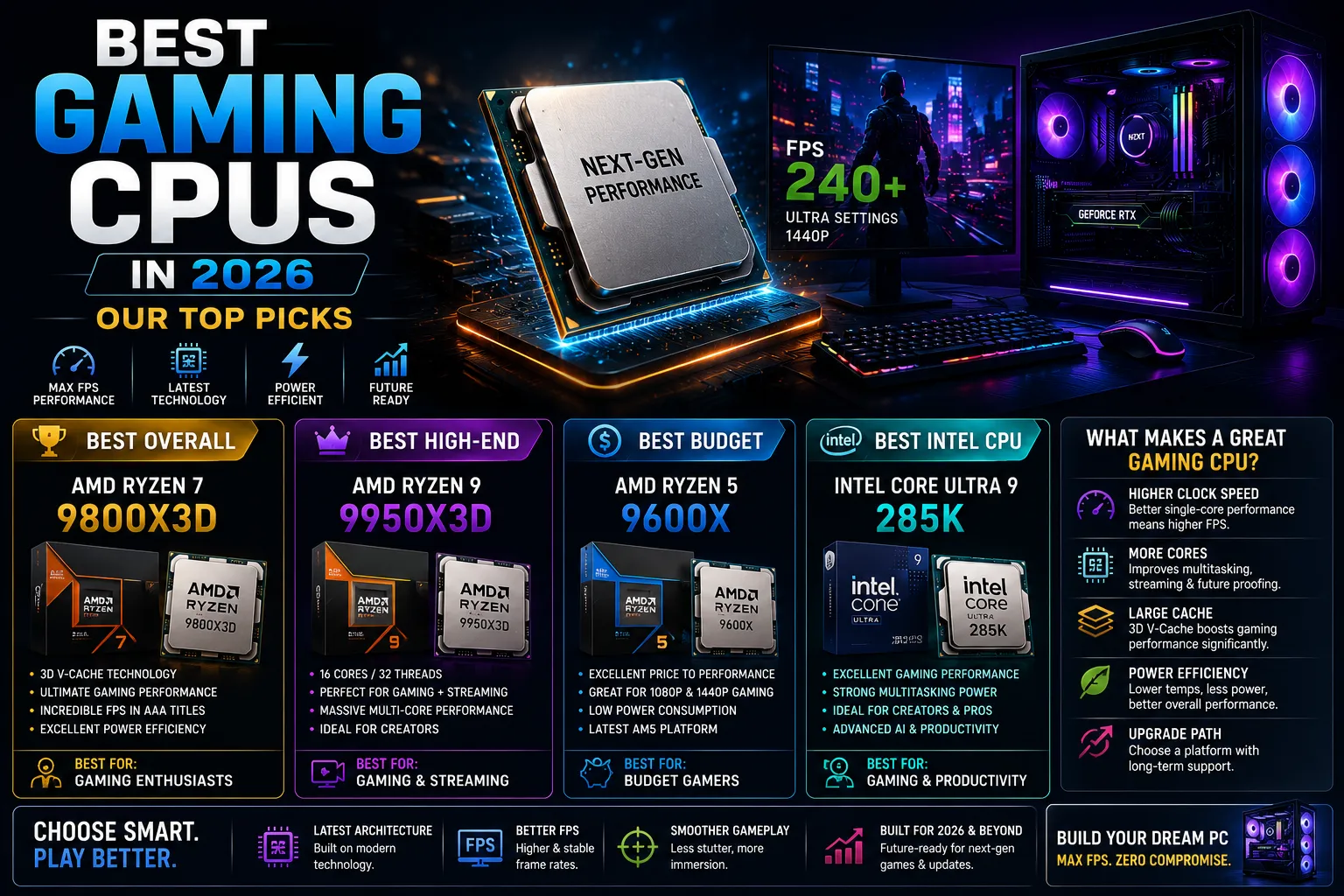
Best Overall: AMD Ryzen 7 9800X3D (~$449)
The Ryzen 7 9800X3D is the best gaming CPU in 2026 for most players. It's 96MB 3D V-Cache delivers a 10–15% frame rate advantage over competing processors in CPU-bound scenarios, according to Tom's Hardware benchmarks (2026). The Ryzen 7 9800X3D outperforms the Core i9-14900K by 27% and the Core Ultra 9 285K by 38% in gaming benchmarks.
Best for: PC gamers who prioritize maximum frame rates and play at 1080p or 1440p on high-refresh-rate monitors.
Platform: AMD AM5 | DDR5 required
Best for Performance + Productivity: AMD Ryzen 9 9950X3D (~$699)
The Ryzen 9 9950X3D combines AMD's second-generation 3D V-Cache with a dual-chiplet design, an 8-core chiplet with 3D cache for gaming, and a second 8-core chiplet with a 5.7GHz boost clock for multithreaded workloads. This chip is the best option for streamers, content creators, and gamers who run demanding background applications while playing.
Best for: Streamers, video editors, and power users who need top-tier gaming and content creation performance from one chip.
Best Mid-Range: Intel Core Ultra 7 270K Plus (~$349)
Intel's Arrow Lake Refresh lineup, including the Core Ultra 7 270K Plus, brought meaningful improvements to both gaming and multi-threaded performance. The 270K Plus competes with AMD's non-X3D Ryzen chips at similar price points and significantly outperforms them in multi-threaded workloads, making it a strong pick for gamers who also do rendering or game development.
Best for: Gamers who want strong all-around performance without paying for 3D V-Cache, and who value Intel's Binary Performance Optimization (BPO) technology for supported titles.
Best Budget Gaming CPU: AMD Ryzen 5 9600X (~$199)
The Ryzen 5 9600X delivers 6 cores and 12 threads with Zen 5 architecture at an accessible price. For gamers playing at 1080p or 1440p on mid-range GPUs, the 9600X provides ample CPU performance without paying for cache or core counts that won't improve gaming frame rates at the GPU-limited end of the performance spectrum.
Best for: Budget builders and first-time PC gamers pairing a mid-range GPU (RTX 4060 Ti / RX 7700 XT tier).
Best for AM4 Upgrade: AMD Ryzen 5800X3D (~$199–$249 used/refurbished)
Gamers on older AM4 platforms who want 3D V-Cache performance without a full platform upgrade can still find strong value in the Ryzen 5800X3D. AM4 is a mature platform with affordable B550 and X570 motherboards, making this a cost-effective path to X3D technology.
Best for: AM4 users who want to extend their current platform before upgrading to AM5.
AMD vs. Intel for Gaming: Where Does Each Stand?
The AMD vs. Intel debate has been the defining conversation in the gaming CPU market for years. In 2026, the answer is clearer than it has ever been with important nuance.
AMD's Current Advantage
AMD's 3D V-Cache CPUs, the Ryzen 7 9800X3D, Ryzen 7 9850X3D, and Ryzen 9 9950X3D, deliver the best gaming performance at every performance tier where the technology is available. According to benchmark data from PC Gamer, Tom's Hardware, and Club386, AMD's X3D processors are the top gaming CPUs across the largest body of title testing in 2026.
AMD's AM5 platform also offers better long-term value: the socket supports current and confirmed future CPU generations, reducing the platform replacement cost when upgrading.
Intel's Case
Intel's Arrow Lake Refresh processors, especially the Core Ultra 7 270K Plus and Core Ultra 5 250K Plus, are strong all-around CPUs. Intel's Binary Performance Optimization (BPO) technology improves performance at the assembly-code level for supported titles, and the platform offers competitive pricing on DDR5 motherboards.
Intel processors remain the better choice for productivity-heavy workloads (3D rendering, code compilation, data science), where high multi-threaded performance matters more than gaming cache size.
The Platform Cost Reality
In 2026, DDR5 memory prices are elevated due to supply constraints. Both AMD AM5 and Intel LGA1851 require DDR5. Budget-conscious builders upgrading from older DDR4 platforms should factor in the cost of both a new motherboard and DDR5 memory, not just the CPU price, when comparing total build costs.
How to Choose the Right Gaming CPU for Your Build
Set Your Budget (Including Platform Costs)
Your CPU budget should account for the full platform: processor, motherboard, and RAM. A $449 Ryzen 7 9800X3D paired with a budget B650 motherboard and 32GB DDR5-6000 will run you roughly $650–$700 total for the CPU platform before GPU, storage, or case.
Prioritize CPU budget based on your GPU tier:
RTX 4060 / RX 7600 tier GPU: A $199–$249 CPU, like the Ryzen 5 9600X, is sufficient; the GPU will bottleneck before the CPU.
RTX 4070 Ti / RX 7900 XT tier GPU: A $349–$449 CPU (270K Plus or 9800X3D) removes the CPU as a limiting factor.
RTX 5090 / high-end GPU: Only at this tier does the full performance gap of the 9800X3D vs. budget CPUs become fully visible in benchmarks.
Identify Your Primary Use Case
Pure gaming, especially competitive gaming at high refresh rates on 1080p or 1440p: choose the best gaming CPU available within your budget. AMD X3D chips are the clear answer.
Gaming + streaming simultaneously: the Ryzen 9 9950X3D or Intel's higher core-count chips handle streaming encoding without impacting game frame rates.
Gaming + content creation (video editing, 3D rendering): prioritize multi-threaded performance. The Ryzen 9 9950X3D is the best single chip for this combination in 2026.
Consider Platform Longevity
AMD's AM5 platform is confirmed to support future Zen 6 CPUs. If you plan to upgrade your CPU within the next 2–3 years without replacing the motherboard, AM5 is the stronger long-term platform investment as of 2026.
Match Cooling to TDP
65W CPUs (Ryzen 5 9600X): A $30–$50 tower cooler is sufficient
120W CPUs (9800X3D): a $50–$80 tower cooler or 240mm AIO
170W CPUs (9950X3D): a 280mm or 360mm AIO for optimal sustained performance
What Resolution Are You Gaming At? It Changes Everything
Gaming resolution fundamentally changes which CPU matters most and by how much.
1080p Gaming
At 1080p, the GPU delivers frames fast enough that the CPU becomes the bottleneck in many scenarios. This is where CPU differences are most visible. The Ryzen 7 9800X3D's 96MB cache delivers 10–18% higher frame rates than the Ryzen 7 9700X's 32MB cache at 1080p, according to Gamer Hardware benchmarks (2026). Competitive gamers on 240Hz+ monitors gain the most from premium gaming CPUs at this resolution.
1440p Gaming
At 1440 p.m., the GPU shoulders more of the workload. The CPU performance gap narrows the cache advantage of X3D chips, which shrinks from 10–18% to roughly 5–8% compared to standard Ryzen or Intel chips. A mid-range CPU paired with a strong GPU remains a sensible build at this resolution.
4K Gaming
At 4K, the GPU is almost entirely the bottleneck. CPU performance differences between, say, a Ryzen 7 9800X3D and a Ryzen 5 9600X shrink to 2–4% in average frame rate. At 4K, the budget redirected from CPU to GPU delivers a larger performance improvement.
Gaming CPU Benchmarks and Key Data
All figures sourced from published hardware review outlets as noted. Verify independently before using in commercial contexts. Data current as of May 2026.
The Ryzen 7 9800X3D outperforms the Core i9-14900K by 27% and the Core Ultra 9 285K by 38% in gaming benchmarks (Tom's Hardware, 2026)
The Ryzen 7 9800X3D's 96MB L3 cache is 3x the cache of the standard Ryzen 7 9700X (32MB)
At 1080p in CPU-bound games, the 9800X3D delivers 10–18% higher frame rates than non-X3D equivalents (Gamer Hardware, 2026)
At 4K, the CPU performance gap between the 9800X3D and budget alternatives narrows to 2–4% (Gamer Hardware, 2026)
Six cores are the minimum for smooth modern gaming; eight cores handle all current titles without compromise
The Ryzen 7 9850X3D (released January 2026) offers approximately 3% more gaming performance than the 9800X3D at a higher price point. The 9800X3D remains the recommended value pick (Tom's Hardware, 2026)
Intel's Core Ultra 7 270K Plus outperforms AMD's Ryzen 7 9700X by over 2x in Cinebench 2026 multi-threaded tests, demonstrating Intel's continued multi-threaded strength (Club386, 2026)
DDR5 memory prices are elevated in 2026 due to industry supply constraints, increasing the total platform cost for both AM5 and Intel LGA1851 builds
Note: CPU benchmark results vary based on specific game, resolution, GPU pairing, memory configuration, and driver version. Use benchmark data as a directional guide, not an absolute predictor of your specific system performance.
Real-World Testing: 3D V-Cache Makes the Difference
Most CPU guides compare spec sheets or relay benchmark charts without explaining the why behind the numbers. Understanding the mechanism helps you make a smarter buying decision.
How 3D V-Cache Actually Works
AMD's 3D V-Cache technology stacks an additional SRAM die vertically on top of the CPU's compute chiplet using hybrid bonding. On the Ryzen 7 9800X3D, this adds 64MB of L3 cache to the native 32MB, bringing total L3 to 96MB.
Why does this help gaming? Modern game engines constantly access large datasets, AI behavior trees, physics objects, and asset streaming buffers. When this data fits in the L3 cache, the CPU retrieves it in nanoseconds. When data spills to system RAM, the retrieval time jumps significantly. More L3 cache means more game data stays close to the CPU cores, reducing frame time spikes and maintaining smoother frame delivery.
This is why the 9800X3D can outperform CPUs with higher clock speeds and more cores in gaming scenarios. Clock speed determines how fast the CPU processes data; cache size determines how often the CPU has data ready to process without waiting.
Intel's Counter: Binary Performance Optimization (BPO)
Intel's Arrow Lake Refresh chips support Binary Performance Optimization (BPO), a technology that optimizes CPU instruction scheduling for specific supported applications, including several major game titles. BPO operates at the assembly-code level, improving performance without overclocking or hardware modification. For the supported title list, BPO delivers meaningful frame rate improvements on 270K Plus and 250K Plus chips, narrowing the gap with AMD's X3D processors in those specific games.
Conclusion
The best gaming CPU in 2026 isn't just the one with the highest benchmark score; it's the one that matches your resolution, your GPU, your budget, and your use case.
For most PC gamers and streamers building at 1080p or 1440p on high-refresh-rate setups, the AMD Ryzen 7 9800X3D is the clear answer. Its 3D V-Cache advantage over every competing chip is real, measurable, and most visible exactly where competitive gaming performance matters most.
For budget builders, the Ryzen 5 9600X delivers more than enough CPU performance when paired appropriately. And for gamers who want maximum performance across both gaming and creative workloads without compromise, the Ryzen 9 9950X3D earns its premium price.
Frequently Asked Questions
Q: What is the best gaming CPU in 2026?
The AMD Ryzen 7 9800X3D is the best gaming CPU for most players in 2026. Its 96MB 3D V-Cache architecture delivers the highest gaming frame rates of any consumer CPU at its price tier, with a 10–15% average FPS advantage over competing processors in CPU-bound scenarios. For those who want peak gaming and productivity performance from one chip, the Ryzen 9 9950X3D is the best overall processor.
Q: Is AMD or Intel better for gaming in 2026?
AMD is currently better for pure gaming performance in 2026, primarily because of 3D V-Cache technology in the Ryzen X3D line. Intel's Arrow Lake Refresh chips (Core Ultra 7 270K Plus, Core Ultra 5 250K Plus) are competitive all-rounders that win in multi-threaded workloads and some streaming use cases. For gaming-only builds, AMD X3D processors consistently deliver higher frame rates across the widest range of titles.
Q: How many CPU cores do I need for gaming?
Eight cores are the recommended minimum for a future-proof gaming build in 2026. Six cores handle most current titles without issue, but eight cores provide headroom for demanding games like Cyberpunk 2077 and Starfield, as well as background applications like Discord, streaming software, and browser tabs. Beyond eight cores, additional CPU cores provide minimal gaming performance improvement.
Q: Does more cache make a CPU better for gaming?
Yes significantly. Cache size is one of the most impactful CPU specifications for gaming performance. AMD's 3D V-Cache technology tripled the L3 cache on X3D chips, and the results are measurable: the Ryzen 7 9800X3D (96MB cache) delivers 10–18% higher frame rates at 1080p than the Ryzen 7 9700X (32MB cache), despite similar core counts and similar clock speeds.
Q: What CPU do I need for 4K gaming?
At 4K resolution, the GPU is almost always the bottleneck. A mid-range CPU like the Ryzen 5 9600X or Intel Core Ultra 5 250K Plus provides sufficient CPU performance for 4K gaming. The frame rate difference between these chips and the top-tier 9800X3D at 4K is typically only 2–4%. At 4K, invest your budget in the best GPU you can afford and a capable mid-tier CPU rather than the most expensive gaming processor available.
Q: Is the Ryzen 7 9800X3D worth the price?
Yes, for gamers who play at 1080p or 1440p on high-refresh-rate monitors (144Hz+). The 9800X3D's performance advantage over cheaper alternatives is largest at these resolutions in CPU-bound scenarios, which is exactly where competitive gaming benchmarks run. For casual gamers on mid-range GPUs at 1440p or 4K, a Ryzen 5 9600X at roughly half the price delivers comparable real-world frame rates in GPU-limited scenarios.
Share this article
Related Articles

Gamification in 2026: The Complete Guide to Engagement, Motivation & Growth
Discover how gamification in 2026 boosts engagement, motivation, and business growth through rewards, AI-driven experiences, leaderboards, and interactive digital strategies.
What Is Ping in Gaming? The Ultimate Guide to Latency, Lag & Low-Ping Performance
Low ping can mean the difference between victory and defeat. Learn what ping really is, how latency affects online gaming, and the best ways to reduce lag for smoother, faster gameplay in 2026.
Best SoC for Gaming Consoles in 2026: The Chips That Actually Drive Your Games
Explore the most powerful gaming console SoCs of 2026, from advanced AMD and NVIDIA chips to next-gen AI-powered processors delivering smoother gameplay and faster performance.